Getting started with imgLang
From first launch to clean batch export in four steps. No subscription, no account wall, and images stay on your Windows PC.
1. Install on Windows 10/11 (64-bit)
- Full offline installer (~1.4 GB): bundles the app, local RapidOCR models (Chinese, English/Latin, Japanese), and the local HY-MT offline translation engine so you can work air-gapped from minute one.
- Compact installer (~307 MB): skips the local offline translation engine for faster download; you can use optional free online engines right away or download the local engine later inside Menu → Tools → Translation engine settings….
- Safe user data folder: projects, glossaries, and settings live in
%LOCALAPPDATA%\imgLang— installing updates or uninstalling keeps your work intact unless you explicitly ask to remove it.
2. Translate a folder in the Free Trial
Every feature is unlocked during evaluation with no day limit, no image cap, and no sign-up screen.
- On first launch, follow the optional three-step onboarding check (choose local offline HY-MT or online engine and test a sample phrase), or skip straight to the home screen.
- Click New project (for multi-language review, glossary, and saved progress) or Simple translate (for a quick folder → translate → export pass).
- Select your source image folder and up to five target languages, then start extraction. Local OCR detects text boxes and translates every string into a deduplicated project table.
Want to verify that nothing leaves your PC in offline mode? Open Help → Offline & privacy in the app or read our network audit guide.
3. Review, adjust layout, and enforce terms
- Image review grid: scan thumbnails by language and status (Passed, Pending, Needs fix, Anomaly, No text). Left-side pie badges show a check mark once a language is completely reviewed.
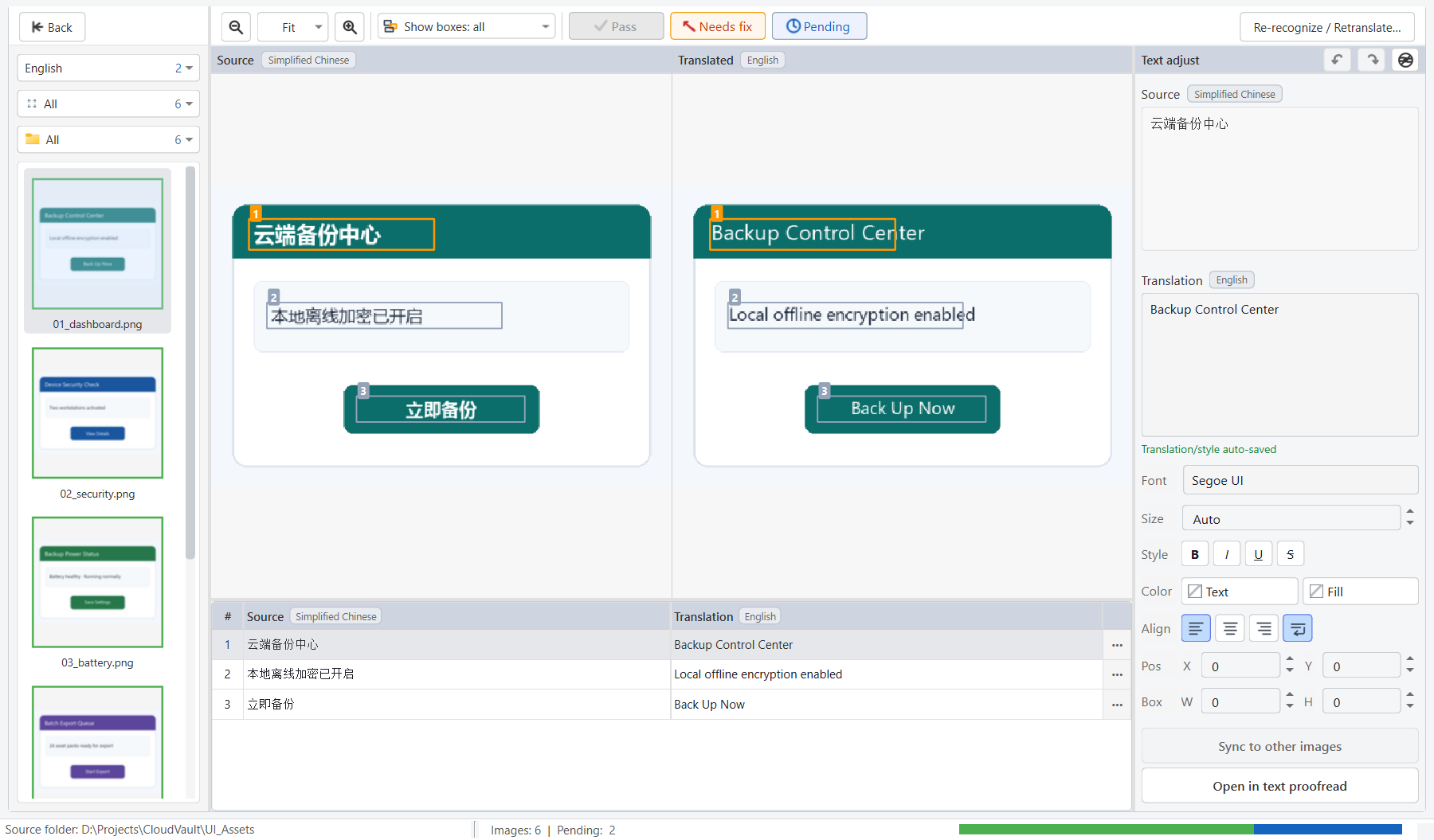
- Side-by-side compare desk: double-click any image to inspect source vs. translated output, tweak wording, resize/nudge text boxes, or sync an edit across matching images.
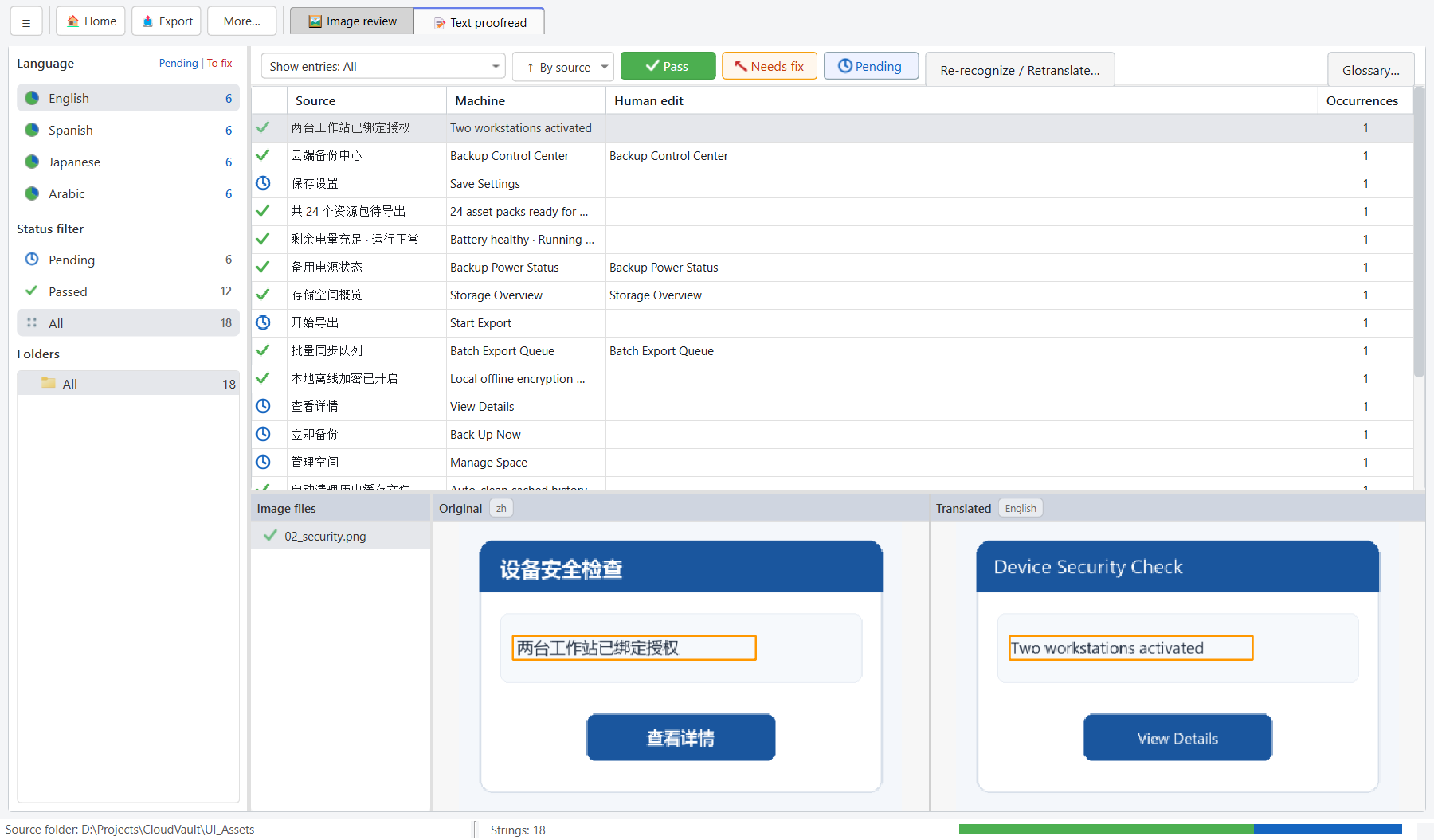
- Text proofread sheet & glossary: review unique strings once in a table, lock product terms per language in Glossary…, and catch leftover source characters or overflow before export.
4. Buy once, activate, and export watermark-free
In the Free Trial, exported images include a light diagonal “imgLang Demo” watermark. Activating Standard ($24.90 USD) or Professional ($34.90 USD) removes the watermark immediately — no subscription.
- Buy in-app or on the web: open Help → Purchase / Activate… inside imgLang (recommended — activates this PC automatically as soon as Paddle confirms payment), or buy on the imgLang pricing page.
- Paste your key anytime: Paddle emails your receipt and our license server sends your signed license key to the same address. Paste it into Enter license key on up to two Windows machines (for example home and office).
- Export clean packs: click Export in the workspace toolbar. Approved and no-text images are pre-selected by default so unreviewed drafts never slip into a release build by accident.
Need help?
If activation fails, you need to move a machine seat, or an image layout looks off, use Help → Report an issue… to export a redacted diagnostic zip (no private images or translations included) and email support@jonysun.com.